
Download Video TikTok
Tanpa Watermark
Download any TikTok video in HD — clean, fast, and free.
Works on iPhone, Android, PC & Mac. No app needed.
100% Safe & Secure | No Registration | Works on All Devices
Download Video TikTok Tanpa Watermark – Free, Safe & HD Online
TikTok is an app where Millions of people watch reels, shorts, and other entertainment videos every day, and suddenly, one video comes to their feed that feels relatable. The moment you see one, you want to download and save it to your gallery, but then you realise it’s either restricted or has an annoying watermark. That’s where you need our tool to download Video TikTok tanpa watermark, which is advanced, fast, and reliable for high-quality downloads in mere seconds.
With our TikTok downloader, you can save any TikTok format, whether it’s HD, 4K, MP4, MP3 Audio, or even slide shows and photos. The true advantage lies in its compatibility: you can use the tool on Android phones, Windows PCs, iPhones, and other iOS devices, since we built it to be entirely browser-based. So, don’t wait, copy the video link, paste it in the box, and Hit Download to start enjoying your favourite clips completely watermark-free.
How to Download Video TikTok Tanpa Watermark HD
If you are not tech-savvy enough to download a TikTok video using our tool, you can follow our simple guide. Below are the 5 steps to save any video real quick.
- First, open the TikTok app and search for the video you want to download.
- Copy the Link: Choose the video you want to download and tap the share button, where you will see an option to copy the link. Click on it, and the link will be copied.
- Paste it here: Now, come back to our website, paste the video link into the toolbox, and click the download button.
- Choose Resolution: When you click the download button, the list of resolution options appears. Select the format you want to save in, like HD, MP4, or MP3.
- Save to Your Device: Once the format is selected, tap the final save button to save the video directly to your gallery. That’s how you do it.
Note for iPhone/iOS Users: iPhone users can follow the same steps, but there’s one thing to keep in mind. After downloading, you will find your video in the Files app rather than your Photos gallery.
Screenshots

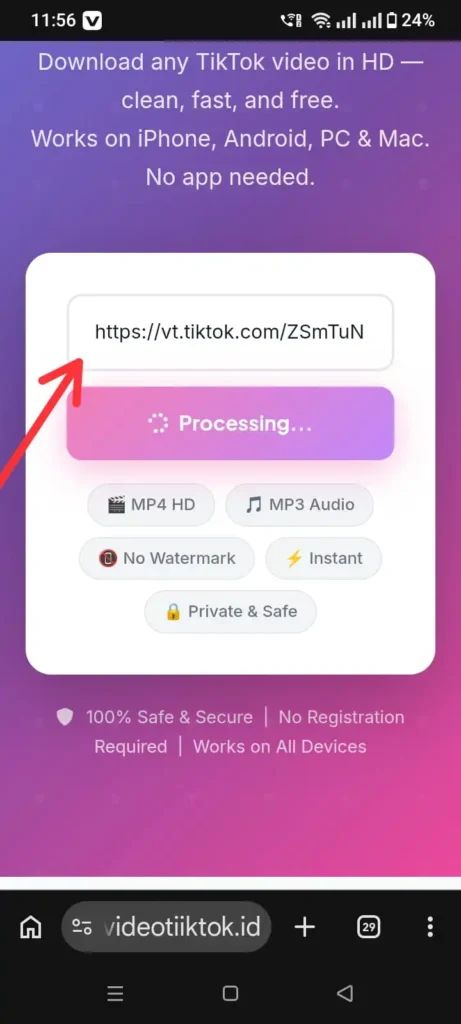
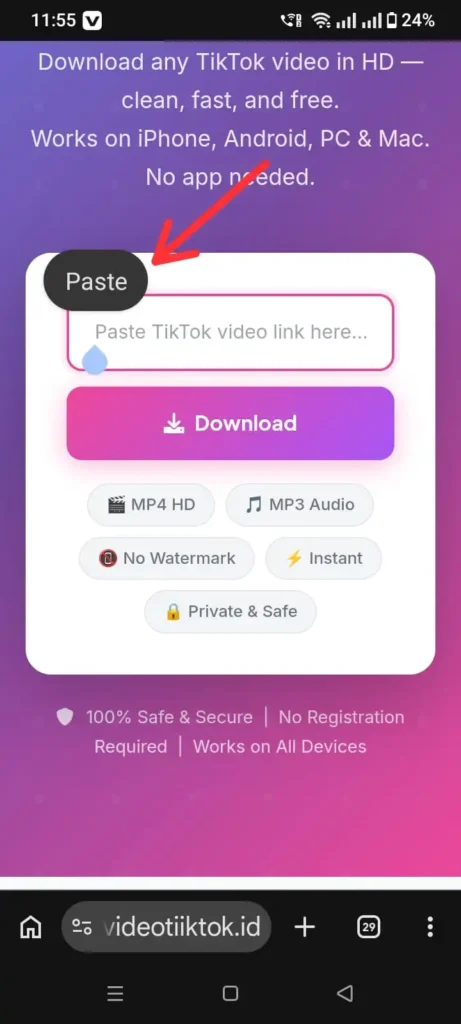

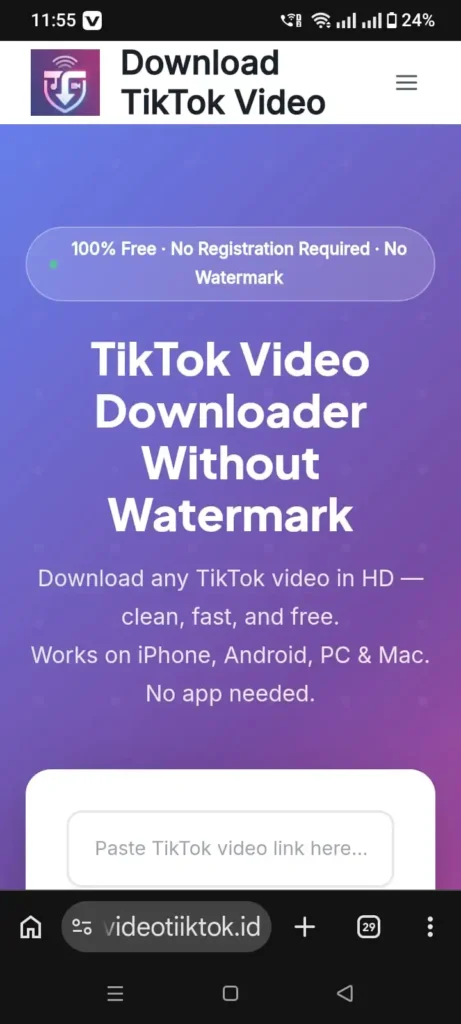
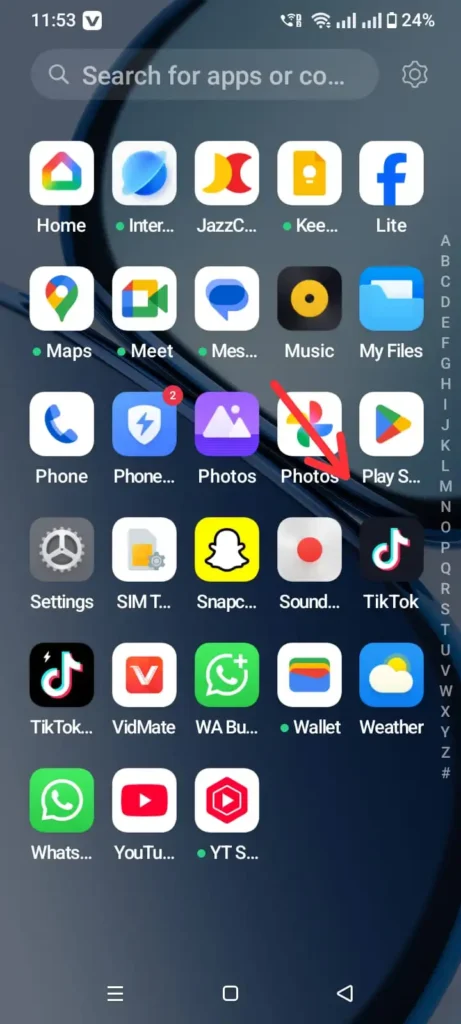
Method to Download Video TikTok Tanpa Watermark on PC
Those who prefer large-screen scrolling on a PC can enjoy the same smoothness and fast lighting as on a mobile. Below is the method to save or download a video from TikTok Tanpa Watermark.
- Find the Video: First, open your browser, like Chrome, Firefox, or Edge, whatever you prefer, and search for TikTok.com. Now, find the video you want to keep in your gallery.
- Copy the Link: If you have selected the video, click on the share icon, copy the link, and return to our website.
- Paste and Download: Now paste the link into the box labeled “Paste Video link here.” Click the download button, then choose the resolution you want.
- Save to Your PC: Depending on the clip size, the video may take a few seconds to a few minutes to save. But once downloaded, you can find it in your computer’s download section.
Why Use Our Free TikTok Video Downloader?
While our TikTok Video Downloader tool offers the convenience of a one-click download, it does much more. We prioritize keeping your videos crystal clear, safe, and watermark-free, making our tool the ideal option to download Videos from TikTok Tanpa Watermark.
Unlimited Access
You can save as many videos as you want, without worrying about the limits or asking to upgrade to Pro. We believe in keeping things simple and free so you can create a library of your personal collection.
Download Video TikTok Tanpa Watermark
When you download a video directly from the TikTok app, it automatically adds a 2-3-second ad with their logo at the end. But our tool skips that annoying part and gives you the original video as is, keeping the clip professional and free of logos.
Highest Quality Upto HD & 4K
The best part of using our tool to download Video TikTok is its support for multiple formats. You can download the video in 480p, 720p, 1080p HD, and 4K, all without compromising video quality.
Support for Slideshows & Photos
In addition to video downloading, our TikTok Downloader supports popular slideshow and photo gallery formats. Now you don’t have to take blurry screenshots of aesthetic clicks or posts that you feel relate to you.
Extract Audio and Save as MP3
It’s all about the preference: sometimes we don’t like the video but feel connected to the song. Our tool has both options available for you as it pulls the audio out of any TikTok clip and saves it as a high-quality MP3 file. No need to install extra converters, just hit the MP3 option and save it instantly.
Works on All Your Devices
Since the tool is optimized for browser access, you can use it on any cross-device you want. Whether it’s a PC, Android phone, Mac, tablet, or iPhone, search for it on your preferred platform and start saving your favourite clips.
Fast & Reliable TikTok Downloads
We have optimized our servers for lightning speed, so your videos will be processed and downloaded in seconds. Saving your time from watching a slow progress bar on your screen, so you get straight access to the content you love.
100% Free & No Hidden Costs
Last but not least, we do not charge anything for using our tool; it’s 100% free for everyone. It doesn’t matter whether you are using it for one clip or a bunch of videos, because it has no limitations and no hidden costs.
Common Issues When Downloading Video TikTok Tanpa Watermark
Even though our TikTok downloader is as smooth as it can be, sometimes things don’t go your way. Below are the common hurdles and their solutions, in case anything happens to you.
- Private or Restricted TikTok videos: They only appear when the original creator has set their account to private or disabled the download option in settings. While our tool breaks these boundaries in most cases, some videos may not be downloadable.
- Copying the Wrong Link: Sometimes, we are in a hurry and copy the profile link instead of the specific video link that we want to save. It’s better to double-check you have copied the right URL.
- Regional Restrictions: If you are facing region restrictions, the block is from the TikTok app, not from you or the creator who uploaded it. You can use a VPN to overcome this hurdle.
- Deleted or Missing Content: This happens in daily life when we save content in the TikTok app for later download, only to find that the creator has removed it or the link is broken. There’s no solution for this, but it’s recommended to download as soon as you see your favourite clips.
FAQs
Final Verdict
To conclude, our tool’s sole priority is to provide a convenient way to download videos TikTok without watermarks, and it does so precisely. By using our TikTok Downloader, you can download videos in High-quality formats while keeping the clean, professional look. It’s easy to use, fast to respond, and hosted on a reliable server that will serve you no matter how much load there is.